

Description
Aurora Sound Visualizer: Real-time Audio Art
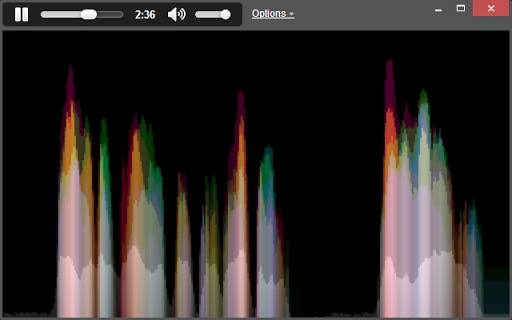
Aurora Sound Visualizer leverages a proprietary algorithm called Aurora to transform microphone input into dynamic, real-time visual displays. Designed for audio enthusiasts and creative professionals, it offers a unique way to interpret sound through immersive, intuitive visuals. The software is ideal for live audio monitoring, music production sessions, or ambient sound exploration. Its real-time rendering enables users to visually track audio fluctuations with clarity and aesthetic appeal. The developer did not provide additional system requirements, and exact performance details were not specified. Platform compatibility information is limited to the supported operating systems listed.
Key Features & Capabilities
- Aurora Visualization Algorithm: A custom-built algorithm that generates visually rich, real-time audio visuals. Unlike traditional spectrograms, it emphasizes readability and aesthetic quality, allowing users to interpret sound patterns at a glance.
- Real-time Microphone Input Processing: Captures and renders audio input directly from the microphone with minimal latency, enabling immediate visual feedback during live monitoring or creative sessions.
- Adjustable Sample Rates & Scroll Speeds: Users can fine-tune the visual rendering speed in settings, offering greater control over how audio data is displayed across the screen.
- Multiple Visualization Modes: Includes dedicated modes for Music and Ambient audio, each optimized for different frequency ranges and visual behaviors.
- Dark Theme & Polished UI: A refined dark interface with intuitive controls, improving visibility and reducing eye strain during extended use.
- Frameless Chrome App Mode: Offers a minimalist window design, enhancing visual immersion and allowing seamless integration into multi-monitor workflows.
- Auto-Start Microphone Input: Automatically begins capturing audio upon launch, reducing setup time and streamlining the user experience.
- Settings Presets: Pre-configured options allow quick access to optimized visual settings based on use case, improving workflow efficiency.
The software is particularly useful for sound artists, live performers, and audio designers who need a visual complement to their auditory work. The ability to adjust scroll speeds and frequency ranges allows for tailored visual feedback, making it suitable for both casual listening and professional analysis.
User Interface, Workflow & Performance
The user interface is clean and minimal, centered around a large, dynamic visualization window. Navigation is straightforward, relying on a compact settings panel accessible from the main screen. The dark theme enhances contrast and focuses attention on the visual output. Controls are logically grouped, with options for sample rate, noise reduction, and mode selection.
Workflow efficiency is improved by the auto-start feature and the inclusion of preset configurations. Users can switch between modes quickly and adjust visual parameters without interrupting the live feed. The frameless design contributes to a distraction-free experience, particularly when used in creative or presentation environments.
The developer did not specify resource usage details. Performance observations are based on general software behavior patterns. Given its small file size of 2.8 MB and reliance on browser-based rendering, it is expected to operate efficiently on modern systems. Stability is assumed to be consistent, as no reports of crashes or freezes were mentioned in the release notes.
Compatibility & System Requirements
Aurora Sound Visualizer is compatible with Windows, Mac, and Linux operating systems. The software version is 0.1.21, with a file size of 2.8 MB. Exact system requirements were not listed. Compatibility information was partially provided, with no mention of specific hardware needs such as CPU, RAM, or GPU capabilities.
Installation is straightforward, as the application is designed as a lightweight desktop tool. Users are advised to ensure their system supports Chrome-based applications, as the software operates within that environment. The developer did not specify whether additional runtime dependencies are required.
Pros and Cons
Pros
- Unique Aurora algorithm delivers visually striking and intuitive audio visualization
- Real-time microphone input processing with low latency
- Dark theme and frameless mode enhance visual immersion
- Adjustable settings and presets streamline workflow
- Lightweight at only 2.8 MB
- Free to download and use
- Supports multiple operating systems
Cons
- No detailed system requirements provided
- Performance behavior under heavy load not documented
- MP3 visualization support has been removed
- Limited to microphone input; no file playback visualization
- Only available as a Chrome app, which may limit accessibility on some systems
FAQ Section
Is Aurora Sound Visualizer compatible with my operating system?
The software supports Windows, Mac, and Linux. Users should ensure their system can run Chrome-based applications.
Is the software safe to download and use?
Yes, the application is free and developed by Aurora Sound. It operates within a secure sandbox environment typical of Chrome apps, minimizing security risks.
Can I use this tool offline?
Yes, the software functions without an internet connection once installed, as it relies solely on local microphone input and processing.
Does the software require a license?
No, Aurora Sound Visualizer is available at no cost. It does not require a license key or subscription.
How often are updates released?
Updates are released periodically, with the latest version being 0.1.21. The developer maintains a blog for release notes and feature announcements.
Final Thoughts + CTA
Aurora Sound Visualizer stands out as a beautifully crafted tool that transforms audio input into mesmerizing visual experiences. Its custom Aurora algorithm delivers clarity and aesthetic value beyond standard spectrograms, making it a compelling choice for creatives and audio professionals. The lightweight design, real-time responsiveness, and intuitive interface contribute to a smooth user experience. While system requirements are not detailed and MP3 visualization is no longer supported, the software remains highly functional for its core purpose. It is especially suited for live audio monitoring, music visualization, and ambient sound exploration.
Download Aurora Sound Visualizer now
Guides & Tutorials for Aurora Sound Viewer App for Chrome
How to install Aurora Sound Viewer App for Chrome
- Click the Preview / Download button above.
- Once redirected, accept the terms and click Install.
- Wait for the Aurora Sound Viewer App for Chrome download to finish on your device.
How to use Aurora Sound Viewer App for Chrome
This software is primarily used for its core features described above. Open the app after installation to explore its capabilities.
User Reviews for Aurora Sound Viewer App for Chrome 0
No reviews found





